Recap, and the problem with where we left off
In part 1 I proved a FortiGate and a Proxmox host will form a working VXLAN segment with nothing more than a matching VNI, port, and a static list of peer addresses. That works, but it comes with a built in tax: every VTEP has to list every other VTEP. Adding a host means editing the peer list on every existing box, and the only way a VTEP learns which MAC lives behind which remote VTEP is to flood unknown traffic everywhere and watch the replies come back.
At a handful of nodes, that is fine. The point where it stops being fine is exactly the problem EVPN was built to solve: a BGP control plane that distributes reachability so you stop hand listing peers and stop flooding to learn. This post is the swap from static VXLAN to EVPN. I did it first on a single node to isolate the new moving part, then pushed it out to the three node cluster. The data plane (the actual VXLAN encapsulation on the wire) does not change at all. Only the way VTEPs find each other and learn MACs changes.
The reason I’m bothering to write this one up is that almost every wall I hit traced back to a single root cause, and naming it up front will save you the evening it cost me.
The one idea behind every mistake I made
The FortiGate and Proxmox both speak EVPN and they interoperate cleanly. The catch is that they express the same concepts in opposite styles: the FortiGate makes you state things by hand that Proxmox just derives for you.
That is basically the whole story. Proxmox computes a route target from a VNet tag, works out its EVPN address family activation from the controller config, and figures out which VTEP is itself. The FortiGate makes you type each of those out. Every dead end below is a spot where a value I typed on the FortiGate did not match a value Proxmox derived, and because the underlying BGP session comes up perfectly every time, nothing warns you. The session goes Established, EVPN negotiates, routes even get advertised, and then quietly nothing imports.
Keep that test in your back pocket for the rest of this: when a session is Established but importing zero routes, ask what Proxmox auto derived and whether the value you hand typed on the FortiGate matches it exactly.
What EVPN actually buys you
Three things, and it is worth listing them, because on a single node EVPN looks like pure extra work for the same ping you already had:
- Adding a VTEP becomes a one box operation. A new node announces itself over BGP and everyone learns it, instead of you editing N peer lists by hand.
- Flooding mostly stops. MACs get pre distributed as routes, so the gateway can answer ARP locally instead of flooding it across the link to the other site.
- The gateway can live everywhere at once. An anycast gateway puts the same gateway IP and MAC on every VTEP, so a VM is routed by whatever box it happens to sit on, and can migrate between nodes without re ARPing. Static VXLAN structurally cannot do that.
The routes that carry all of this come in types, and three of them matter here. Type 3 (inclusive multicast) is VTEP auto discovery, the direct replacement for the static peer list. Type 2 (MAC/IP) is MAC distribution, which is what kills flood and learn. Type 5 (IP prefix) is L3 routing between subnets, which is the anycast and mobility story for later.
The single node config
Sanitized parameters:
| Item | Value |
|---|---|
| BGP ASN (both ends, so iBGP) | 65001 |
| Segment VNI | 4099 |
| Overlay subnet | 172.31.99.0/24 |
| Overlay gateway (anycast) | 172.31.99.1 |
| FortiGate VTEP / underlay IP | 10.0.50.1 |
| Proxmox VTEP / underlay IP | 10.0.50.11 |
FortiGate
Structurally this is the part 1 VXLAN block with the static remote-ip removed, plus an EVPN instance and a BGP stanza. The EVPN instance carries the route distinguisher and route targets; the VXLAN links to it with evpn-id; BGP carries the routes.
config system evpn
    edit 1
        set rd "10.0.50.1:4099"
        set import-rt "65001:4099"
        set export-rt "65001:4099"
        set ip-local-learning enable
        set arp-suppression enable
    next
end

config system vxlan
    edit "vxlan-evpn"
        set interface "lan"
        set vni 4099
        set evpn-id 1
    next
end

config system switch-interface
    edit "vxsw"
        set type switch
        set member "vxlan-evpn"
        set intra-switch-policy explicit
    next
end

config system interface
    edit "vxsw"
        set ip 172.31.99.1 255.255.255.0
        set allowaccess ping
    next
end

config router bgp
    set as 65001
    set router-id 10.0.50.1
    set ibgp-multipath enable
    config neighbor
        edit "10.0.50.11"
            set next-hop-self enable
            set next-hop-self-vpnv4 enable
            set soft-reconfiguration enable
            set soft-reconfiguration-evpn enable
            set remote-as 65001
        next
    end
end
Note the intra-switch-policy explicit on the software switch. That one creates real sessions for traffic crossing the switch, which is both what makes the flow visible in the session table and what lets it be hardware offloaded on platforms that can offload VXLAN. (Mine cannot, which is its own rabbit hole, but the knob belongs here regardless.)
Proxmox
FRR does the heavy lifting behind the GUI:
apt update && apt install frr frr-pythontools
systemctl enable --now frr
Then under Datacenter, SDN: add an EVPN Controller (ASN 65001, peers listing both VTEPs), an EVPN Zone (with a VRF VXLAN ID, see below), a VNet with tag 4099 in that zone, and a Subnet on the VNet with gateway 172.31.99.1. Apply.
The gotchas, in the order I hit them
Each of these is the same “stated versus derived” mismatch showing up in a different place.
Looking for a per neighbor EVPN enable command
My first instinct on the FortiGate BGP neighbor was to hunt for something like set l2vpn-evpn enable. It does not exist. That is the FRR and Cisco way of activating the EVPN address family per neighbor, and it is exactly what Proxmox uses under the hood. The FortiGate has no explicit per neighbor EVPN toggle. EVPN advertisement turns on implicitly the moment you have a config system evpn instance bound to a VXLAN by evpn-id. The neighbor just needs ordinary iBGP settings plus the EVPN friendly knobs above. Proxmox states activation explicitly, the FortiGate derives it from the instance binding. Same result, opposite style, and I burned time looking for a keyword that was never there.
The route target has to match your real ASN
This is the big one. I had copied an EVPN instance out of an earlier example that used ASN 65000 as a placeholder, but the real box runs 65001. So the FortiGate was importing and exporting 65000:4099, while Proxmox, deriving its route target as ASN:VNI, was using 65001:4099. The BGP session was Established, EVPN negotiated, the FortiGate even announced its routes, and absolutely nothing imported. The route target is the matching key, and Proxmox derives it from a value you never type, so any drift between your hand typed FortiGate RT and your actual ASN silently breaks import. Setting both RTs to 65001:4099 made accepted prefixes start climbing immediately.
The route distinguisher is per VTEP, not shared
In the same block, I had set my RD to the Proxmox node’s address. The RD only needs to be unique per advertising VTEP, so the FortiGate’s RD should be based on its own IP, 10.0.50.1:4099. If two VTEPs advertise the same RD you get route distinction collisions stacked on top of whatever else is already wrong. RD is for uniqueness, RT is for matching. They are easy to mix up because they look alike, but they do different jobs.
Put the IP on the software switch, not the bare VXLAN interface
When I added a second segment later, I tried to shortcut it by putting an IP directly on the VXLAN interface instead of dropping the VXLAN into a software switch and putting the IP on the switch interface. It did not learn MACs and the gateway misbehaved. The pattern that works is: the VXLAN interface has no IP and goes into a config system switch-interface, and the IP lives on that switch interface. A bare VXLAN interface with an IP does not participate in bridge domain learning the same way, so type 2 routes never populate. The segment looks like it exists, but nothing talks.
And while we are here, ip-local-learning enable is not optional. It is what lets the FortiGate watch the switch interface’s ARP table and advertise host MAC/IP as type 2 routes, and arp-suppression depends on it. One placement gotcha I got wrong at first: both ip-local-learning and arp-suppression live under config system evpn, the instance, not on the config system interface stanza. Put them on the wrong object and you get EVPN up with no MAC distribution, which looks exactly like every other “stated versus derived” failure in this list.
Caution
ip-local-learningandarp-suppressionbelong underconfig system evpn, not on the interface. Put them on the wrong object and everything still comes up Established, the FortiGate just silently never advertises a single type 2 route. Nothing errors. You just get no MACs.
The tag IS the route target
This was the capstone, and the cleanest illustration of the whole theme. On a later segment, traffic just would not pass. Everything was Established. The cause was a one digit slip in the Proxmox VNet tag. Because Proxmox derives the route target straight from the tag, a tag typo is silently a route target mismatch. There is no separate field to get wrong and no warning, because the tag and the RT are the same number expressed once. The lesson reduces to four words: mind your tags. On the FortiGate you type the RT; on Proxmox you set a tag and the RT falls out of it; and the two only ever meet if they are the same value.
The VRF VXLAN ID is its own thing
The EVPN zone wants a VRF VXLAN ID, which is a separate VNI used for the L3 routing interconnect between your segments, not for any one segment itself. In show evpn vni you can see it: each segment shows up as type L2, and this one extra VNI shows up as type L3, one per VRF. It just has to be a valid VNI that does not collide with any segment VNI. Pick something memorable and outside your segment range (I used 4000) so the L3 line is instantly recognizable later. The number is arbitrary; the separation is the point.
Proving it worked
Once the route targets matched, the Proxmox side told the whole story. show bgp l2vpn evpn showed the FortiGate’s type 3 route imported with the matching RT, which means the FortiGate auto discovered as a VTEP with no static peer list anywhere. That single imported route is the entire point of the exercise. show evpn vni showed the segment as an active L2 VNI with one remote VTEP, learned purely from BGP. And Proxmox was already advertising a type 2 route for a real VM MAC, so MAC distribution was flowing both ways.
The commands worth banking, FortiGate then Proxmox:
get router info bgp evpn                            # EVPN context: RD, import/export RT per instance
get router info bgp neighbors <peer> routes evpn    # accepted/announced EVPN routes for the peer
diagnose sys vxlan fdb list <vxlan-name>
vtysh -c "show bgp l2vpn evpn summary"
vtysh -c "show bgp l2vpn evpn"
vtysh -c "show evpn vni"Tip
Established but zero accepted prefixes is this whole post’s failure mode in one line. When BGP is up but nothing imports, do not touch BGP. Read the
RT:on the routes and compare it, character for character, to the route target you typed on the FortiGate. It is almost always a stated versus derived mismatch, not a peering problem.
Scaling to three nodes
Two deltas, both small, because the model already scales.
First, BGP discovery. Instead of hand defining each Proxmox node as a neighbor, the FortiGate can match a subnet range and drop matching peers into a peer group with shared settings. New hosts in that subnet form sessions automatically, which is the EVPN philosophy applied to the BGP layer itself: stop enumerating peers. All three nodes came up Established this way with no per node neighbor config.
Second, multiple segments over one session. Each additional segment is its own EVPN instance plus its own VXLAN plus its own software switch on the FortiGate, and its own VNet on Proxmox, all riding the same BGP session. You never touch BGP to add a segment. That is the payoff restated: segments scale by adding objects, the peering never grows. The mental model that holds it together is that the VNI is the segment, the EVPN instance is that segment’s identity in BGP, the route target is the matching key, and one BGP session carries all of them.
The capability that only shows up once you have multiple nodes is the anycast gateway. With the same gateway IP live on every VTEP, a VM can move between nodes and keep using the same gateway because it is local wherever it lands. That is the concrete reason the whole EVPN detour pays for itself, and it is completely invisible on one node.
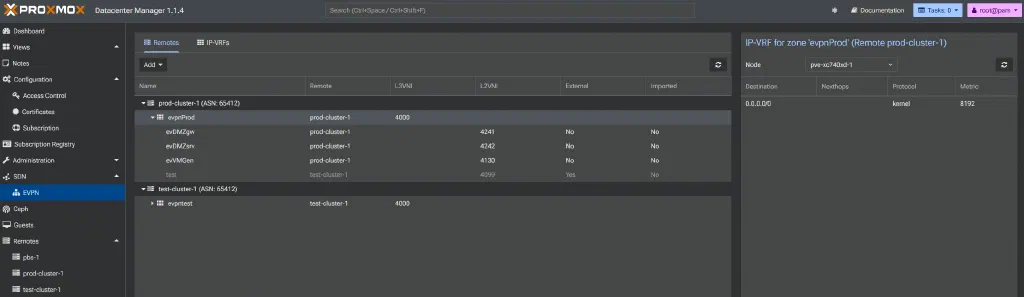
Proxmox Datacenter Manager
Proxmox Datacenter Manager (PDM) has been adding in more support for SDN features, including EVPN. Here is what it looks like currently:
Where this goes next
Everything above is hand typed, and every segment is the identical five object pattern keyed on one VNI, which is exactly the shape that begs to be looped. The next post is automating it: defining the segment list once as data and letting Terraform render both the FortiGate objects and the Proxmox SDN objects, with the route target and the tag both computed from the same number so the “mind your tags” failure mode becomes structurally impossible.
The order matters, though. Build it by hand first, hit these walls, understand every object and how it fails. Then codify the pattern you now actually understand. Automating before you understand it just gives you a black box that deploys broken configs faster. Earning the mental model the hard way is the right moment to hand the typing off to a tool.
For now, the result stands on its own: a FortiGate and a three node Proxmox cluster running a shared EVPN fabric, multiple stretched segments over a single BGP session, with an anycast gateway across all of it. Not a toy, and not much config once you stop fighting the seam between two platforms that say the same thing in different words.
References and further reading
- VXLAN with MP-BGP EVPN (FortiOS Administration Guide) - the FortiGate EVPN instance, VXLAN binding, and BGP example
- config system evpn (FortiOS CLI Reference) - where
rd,import-rt,export-rt,ip-local-learning, andarp-suppressionactually live - Proxmox VE: Software-Defined Network - EVPN controller, zone, and the VRF VXLAN ID
- Proxmox SDN Integration: EVPN concepts - the zone-as-IP-VRF and VNet-as-MAC-VRF mapping, both keyed on ASN:VNI