What code-server is
code-server is Visual Studio Code running as a service on a remote machine, accessed entirely through a web browser. Instead of running VS Code locally on a laptop, you run it on a server, and the full editor experience (file tree, integrated terminal, extensions, git integration) is delivered over HTTP to any browser you point at it.
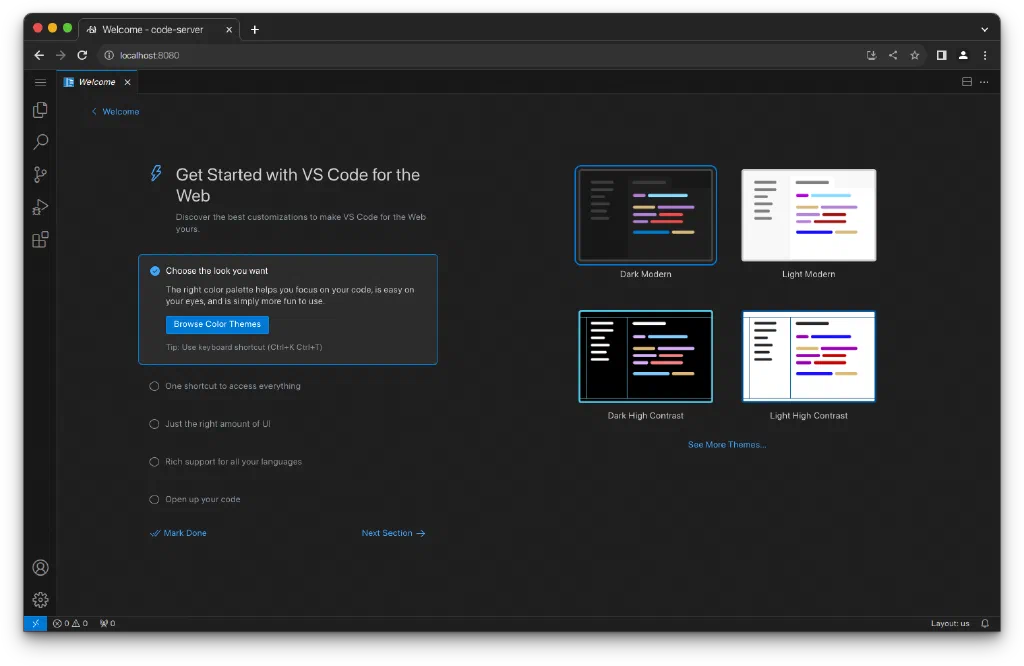
The appeal is obvious: a single, consistent development environment that follows you everywhere. Open a Chromebook, a tablet, a locked-down work laptop, or a friend’s machine, and you land in the exact same editor with the exact same tools, extensions, and open projects. Nothing to install on the client. The heavy lifting (compiling, running containers, filesystem access) happens on the server where the resources actually are.
For a homelab or a personal cloud VM, this is genuinely useful. You get a real, always-on dev environment you can reach from anywhere.
Why exposing it publicly is dangerous
The same properties that make code-server useful make it a serious liability the moment it faces the public internet.
code-server is not just a text editor: it ships with a fully functional integrated terminal, running as whatever user code-server runs as. Anyone who reaches the editor and gets past authentication has an interactive shell on the host.
Interesting!
code-server isn’t an editor with a terminal bolted on, it’s a shell with an editor in front of it. Remote code execution is the feature, not a bug, and that should set the whole threat model.
That changes the calculus completely. A misconfigured blog might leak some data. A misconfigured code-server hands an attacker a shell. The stakes are:
- Arbitrary command execution as the code-server user
- Full filesystem access to anything that user can read
- A pivot point into the rest of your network from a trusted internal host
- Credential theft if SSH keys, cloud tokens, or
.envfiles live where that user can read them
code-server’s built-in authentication is a single shared password. That is fine for a machine on your LAN. It is nowhere near enough for something reachable from the entire internet, where it will be found by automated scanners within hours of going live and subjected to continuous credential-stuffing and brute-force attempts.
So the goal is defense in depth: no single control is trusted to be the only thing standing between the internet and that terminal. The rest of this post is how that gets built.
The architecture
The request path from the public internet to the editor passes through several independent layers, each of which can refuse the connection:
Internet
  |
  v
FortiGate  (VIP / DNAT port-forward, IPS policies, restricted egress)
  |
  v
Main Caddy reverse proxy  (wildcard TLS termination)
  |
  v
code-server host: local Caddy  (host-level gateway)
  |
  v
oauth2-proxy  (Entra ID / OIDC authentication)
  |
  v
code-server  (bound to localhost only)
No layer trusts the layer in front of it to have done the whole job. If any one of them is misconfigured or bypassed, the next one still has to be satisfied.
Layer 1: The network edge (FortiGate)
The code-server VM lives in an isolated DMZ segment, not on the trusted LAN. Inbound access from the internet arrives via a VIP / DNAT port-forward on the firewall, and only HTTPS (443) is forwarded to the front-end reverse proxy. Nothing else from the outside can reach the VM directly.
IPS (intrusion prevention) policies are applied to the traffic hitting this segment, so known exploit signatures and malicious patterns are dropped at the firewall before they ever reach the application stack.
Just as importantly, egress is locked down. The VM is not allowed to talk to arbitrary destinations. Its outbound rules permit only what it actually needs to function:
- DNS resolution
- Reaching the internal restic backup repository
That’s it. No general outbound internet access.
Tip
Lock down egress, not just ingress. An attacker who lands on the box can’t exfiltrate data, pull a second-stage payload, or beacon out to a command-and-control host if the firewall won’t route the connection. It’s one of the cheapest high-value controls you have, and it’s the thing that actually caps the blast radius of a compromise.
Layer 2: The reverse proxy chain (Caddy)
TLS is terminated at a central Caddy reverse proxy that holds a wildcard certificate, so every service behind it gets HTTPS without per-service certificate management. That front-end proxy forwards the code-server hostname to a second, local Caddy instance running on the code-server VM itself.
Running a local gateway on the box (rather than pointing the main proxy straight at the application) keeps the host self-contained: all of its routing, headers, and access rules live with the machine and travel with it. The local Caddy is the only thing on the VM listening on a public-facing port; everything behind it binds to localhost.
Layer 3: Authentication (oauth2-proxy + Entra ID)
This is the layer that actually decides who gets in, and it deliberately replaces code-server’s weak built-in password auth.
oauth2-proxy sits in front of code-server and forces every request through an OIDC login against Entra ID (Azure AD) before anything reaches the editor. Instead of a single shared password, access is gated by the full identity platform: real user accounts, conditional access policies, and multi-factor authentication.
A few properties of this setup matter:
- oauth2-proxy binds only to
127.0.0.1, so it is reachable exclusively through the local Caddy gateway, never directly. - The OIDC app registration is scoped to specific assigned users or a security group, not open to every account in the tenant. This is the single most important knob: MFA and conditional access are only meaningful if the set of people who can even attempt to log in is deliberately small.
- Because Entra handles auth, MFA comes along for free. An attacker with a stolen password still can’t get in.
The practical effect: the code-server login prompt that automated scanners expect to find and brute-force simply isn’t there. What they hit instead is a Microsoft login flow they have no credentials for.
Here’s the stack that implements the gateway and auth layers, the local Caddy and oauth2-proxy run together with docker compose:
services:
  caddy-gateway:
    image: caddy:2
    container_name: caddy-code-gateway
    restart: unless-stopped
    network_mode: "host"
    security_opt:
      - no-new-privileges:true
    volumes:
      - ./caddy-code/Caddyfile:/etc/caddy/Caddyfile:ro

  oauth2-proxy:
    image: quay.io/oauth2-proxy/oauth2-proxy:v7.6.0   # pin the version, don't track latest
    container_name: oauth2-proxy-code
    restart: unless-stopped
    security_opt:
      - no-new-privileges:true
    ports:
      - "127.0.0.1:4180:4180"     # bound to localhost only, reachable only via Caddy
    environment:
      OAUTH2_PROXY_PROVIDER: "entra-id"
      OAUTH2_PROXY_OIDC_ISSUER_URL: "https://login.microsoftonline.com/<TENANT_ID>/v2.0"
      OAUTH2_PROXY_CLIENT_ID: "<CLIENT_ID>"
      OAUTH2_PROXY_CLIENT_SECRET: "${OAUTH2_PROXY_CLIENT_SECRET}"
      OAUTH2_PROXY_REDIRECT_URL: "https://code.example.com/oauth2/callback"
      OAUTH2_PROXY_COOKIE_SECRET: "${OAUTH2_PROXY_COOKIE_SECRET}"
      OAUTH2_PROXY_COOKIE_SECURE: "true"
      OAUTH2_PROXY_COOKIE_SAMESITE: "lax"
      OAUTH2_PROXY_REVERSE_PROXY: "true"
      OAUTH2_PROXY_EMAIL_DOMAINS: "*"
    command:
      - --http-address=0.0.0.0:4180
A couple of things worth pointing out in there. oauth2-proxy publishes on 127.0.0.1:4180 only, so nothing reaches it except through the local Caddy gateway. The image is pinned to a specific version rather than latest, and both containers run with no-new-privileges, which matters for the host layer below.
code-server itself is configured to listen only on localhost, with its own auth turned off:
# code-server should never listen on 0.0.0.0 when a proxy fronts it.
# In ~/.config/code-server/config.yaml:
bind-addr: 127.0.0.1:8080
auth: none          # oauth2-proxy is the auth layer; no redundant password
Caution
auth: noneis only safe here because oauth2-proxy is the gatekeeper and code-server binds to127.0.0.1. Nothing reaches the editor without passing the Entra login first. Setauth: noneon a code-server that’s exposed directly and you’ve published an unauthenticated shell to the internet.
Layer 4: Least privilege on the host
Authentication controls who gets in. The host layer limits what they can do once they’re in, and what happens if that terminal is ever reached.
Two separate users, split by role:
- A dedicated system account (no login shell, no sudo, no home directory) owns and runs the Docker containers for Caddy and oauth2-proxy. It exists only to run the proxy stack.
- A separate interactive user owns the actual code-server workspace and runs the editor. This user has no sudo rights on the box.
Creating them looks like this:
# Service account: runs the Caddy + oauth2-proxy containers.
# No login shell, no home directory, no sudo. Member of docker group only.
sudo useradd -r -s /bin/false -M codesvc
sudo usermod -aG docker codesvc

# Interactive user: owns and runs code-server. No sudo on this host.
sudo useradd -m -s /bin/bash nathan
This split creates a clean trust boundary:
internet -> Caddy (service account) -> oauth2-proxy (service account) -> code-server (interactive user)The service account that runs the internet-facing proxy can’t read the developer’s workspace or SSH keys. The interactive user that runs the editor can’t touch the proxy configuration. If someone breaks out of the code-server terminal, they land as an unprivileged user with no sudo and no access to the proxy stack’s secrets.
Filesystem permissions reinforce that boundary. The ownership map I’m aiming for:
/opt/code-server/docker/        codesvc:codesvc   750   # compose stack + configs
/opt/code-server/docker/.env    codesvc:codesvc   640   # oauth2-proxy secrets
/home/nathan/                   nathan:nathan     750   # interactive user home
/home/nathan/workspace/         nathan:nathan     700   # editor workspace
/mnt/cs-workspace-volume/       nathan:nathan     700   # project data volume
The principle: the internet-facing proxy account (codesvc) can’t read the developer’s files, and the interactive user (nathan) can’t read the proxy stack’s secrets. Applying it:
# Proxy stack owned by the service account
sudo chown -R codesvc:codesvc /opt/code-server/docker
sudo chmod 750 /opt/code-server/docker
sudo chmod 640 /opt/code-server/docker/.env

# Workspace and home locked to the interactive user only
sudo chown -R nathan:nathan /home/nathan /mnt/cs-workspace-volume
chmod 700 /home/nathan/workspace /mnt/cs-workspace-volume
chmod 750 /home/nathan
The stack runs as codesvc, never root, via a systemd unit:
# /etc/systemd/system/codesvc-docker.service
[Unit]
Description=Code Server proxy stack
After=network.target

[Service]
User=codesvc
Group=codesvc
WorkingDirectory=/opt/code-server/docker
ExecStart=/usr/bin/docker compose up
ExecStop=/usr/bin/docker compose down
Restart=always

[Install]
WantedBy=multi-user.target
For container hardening, the compose stack above runs both containers with no-new-privileges, pins image versions rather than tracking latest (so an upstream change can’t silently alter behavior), and binds the application to localhost so the only path in is through the proxy chain.
One limitation worth being honest about: code-server has no native way to jail the integrated terminal to a single directory. You can set a default workspace, but the terminal runs as the interactive user and can cd anywhere that user can reach. The real enforcement is filesystem permissions and the fact that the user is unprivileged, not any application-level sandbox. Plan accordingly, and don’t leave credentials lying around where that user can read them.
Layer 5: Monitoring and active defense
Everything above is preventive. This layer assumes something will eventually get through or be attempted, and makes sure it’s seen and responded to.
- fail2ban watches auth logs and bans source IPs that rack up failed attempts, throttling brute-force and credential-stuffing at the host level.
- Wazuh provides host-based intrusion detection: file integrity monitoring on sensitive paths (the proxy
.env, SSH configuration, systemd units), log analysis, and alerting on suspicious activity. If a watched file changes unexpectedly, it’s flagged. - Zabbix handles availability and performance monitoring, so the host’s health and any anomalous resource usage are visible, and outages surface immediately.
Together these mean an attack in progress generates signal rather than passing silently, and that tampering with the security-relevant files on the box doesn’t go unnoticed.
The baseline underneath all of it
None of the layers above remove the need for the boring host hygiene that every internet-adjacent box should have. A few things I don’t skip.
SSH is keys-only. In /etc/ssh/sshd_config, PasswordAuthentication no and PermitRootLogin no shut off password brute-force entirely, which matters a lot on a box this close to the internet. I also lock the root password outright with sudo passwd -l root, so root is reachable only via sudo from an authorized user.
The host runs its own firewall behind the FortiGate, because no layer trusts the one in front of it. UFW denies inbound by default and allows SSH only from internal management subnets, never the public internet:
sudo ufw default deny incoming
sudo ufw default allow outgoing

# SSH from internal management subnets only, never the public internet
sudo ufw allow from 10.0.0.0/8 to any port 22 proto tcp

sudo ufw enable
unattended-upgrades keeps the OS patched for known CVEs without me babysitting it (sudo apt install unattended-upgrades).
And the secrets. The oauth2-proxy cookie and client secrets are generated with real entropy (openssl rand -base64 32), never committed to git, and live only in the 640 .env owned by codesvc. The OIDC client secret gets rotated in Entra periodically.
The layered picture
No single one of these controls is trusted to be sufficient on its own. Stacked together, an attacker has to defeat all of them in sequence:
| Layer | Control | What it stops |
|---|---|---|
| Network edge | FortiGate DNAT, IPS, restricted egress | Direct access to anything but 443; exploit signatures; data exfiltration |
| Transport | Caddy wildcard TLS + local gateway | Plaintext traffic; direct app exposure |
| Identity | oauth2-proxy + Entra ID + MFA | Unauthenticated and unauthorized users; brute force |
| Host | Split users, least privilege, hardened containers | Privilege escalation; lateral movement; secret theft |
| Detection | fail2ban, Wazuh, Zabbix | Silent brute force, tampering, and outages |
The terminal that makes code-server dangerous is still there. But reaching it now requires getting through the firewall, terminating on the right hostname, passing an Entra login with MFA, and then landing as an unprivileged user on a host that’s watching for exactly that, with no way back out to the internet.
That’s the difference between “exposed” and “exposed responsibly.”
References and further reading
- code-server GitHub page
- code-server, Securely expose code-server. The official guidance on exposing it, and confirmation that the default is a single password on an instance that only binds to localhost.
- oauth2-proxy, Microsoft Entra ID provider. OIDC configuration and the group scoping this setup leans on.
- Fortinet, Virtual IPs with port forwarding. The VIP / DNAT reference for the edge.