Cox gets a lot of criticism, and most of it’s earned. But there’s one thing they do right that a lot of ISPs still don’t: they hand out a full /56 IPv6 prefix via DHCPv6 Prefix Delegation (DHCPv6-PD). That’s 256 individual /64 subnets, which is more than enough for a homelab, however sprawling it gets. This post walks through how I’m using that /56 today, why part of my network still requires manual intervention, and what I want to fix down the road.
If you’ve never worked with IPv6 prefix delegation before, this should also work as a decent introduction to the concept.
A quick IPv6 primer
Note
Skip ahead to The quick version of DHCPv6-PD if you already live and breathe this stuff.
IPv4 gives us roughly 4.3 billion addresses, a number that felt inexhaustible in 1981 and turned out to be laughably small once every phone, laptop, doorbell, and light bulb wanted one. We’ve spent the last two decades patching around that shortage with NAT, which lets thousands of devices share a single public IP by having a router quietly rewrite packet headers as traffic passes through. It works, but it broke the original end-to-end model of the internet. Anything that needs true bidirectional connectivity (VoIP, peer-to-peer apps, some VPN configurations) ends up needing workarounds like STUN, TURN, or port forwarding just to punch through.
IPv6 was designed to make that shortage, and the NAT workaround, unnecessary. Instead of 32-bit addresses, IPv6 uses 128 bits: roughly 340 undecillion addresses, or enough to assign a unique address to every grain of sand on Earth several times over. The practical effect is that NAT stops being a requirement. Every device on your network can have its own globally routable address.
That single change ripples into how IPv6 networks are actually built. Rather than your ISP handing you one address to share, they hand you a prefix, a block of addresses you subnet yourself. Cox delegates a /56 to my FortiGate, which is 256 individual /64 networks to divide up however I like. This happens through DHCPv6-PD: your router requests a prefix and the ISP’s infrastructure hands one back, the same way DHCP hands out a single IPv4 lease, just at a much larger scale.
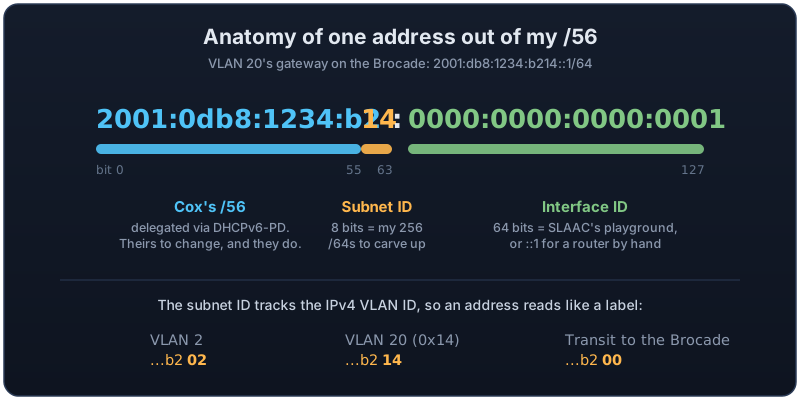
Here’s what that actually looks like inside one of my addresses:
Address configuration also works differently day to day. IPv4 devices almost universally get their address via DHCP. IPv6 supports that too, but it also supports SLAAC (Stateless Address Autoconfiguration), where a device constructs its own address by listening to router advertisements and combining the announced prefix with its own interface identifier, no DHCP server required. Two flags in the router advertisement control the division of labor: the Managed flag tells hosts to get full configuration from DHCPv6, and the Other flag tells hosts to keep using SLAAC for addressing but pull other details (like DNS servers) from DHCPv6. Networks often run both simultaneously.
The /64 boundary is another convention worth internalizing. In IPv4 you might run a /29 for a point-to-point link or a /22 for a large user segment, sizing subnets tightly around host count. IPv6 throws that scarcity mindset out entirely: /64 is the standard subnet size almost everywhere, because SLAAC’s addressing math is built around a 64-bit network portion and a 64-bit host portion. A single /64 contains more addresses than the entire IPv4 internet, so there’s no meaningful reason to subnet tighter.
Plenty carries over from IPv4, though. OSPF still works the same way conceptually, just with an IPv6-specific version (OSPFv3) running alongside the IPv4 one. VLANs, trunking, and switch fundamentals don’t change at all. The real shift is philosophical: IPv4 design is an exercise in conserving a scarce resource, while IPv6 design assumes abundance and focuses on keeping addressing logically organized.
The quick version of DHCPv6-PD
If you’re coming from an IPv4 mindset, prefix delegation feels backwards at first. With IPv4, your router gets one address from your ISP and NATs everything behind it. With IPv6, there’s no NAT in the intended design, so your ISP hands you a block of addresses to subnet however you like.
A DHCPv6-PD exchange has a few pieces worth knowing:
- PD client: the device that requests a prefix from upstream. My FortiGate is the client toward Cox.
- PD server: the device delegating prefixes to something downstream. My FortiGate also acts as a PD server internally, though only in a limited sense (more below).
- IAID (Identity Association ID): an identifier tied to a specific delegation request. If you have multiple WAN interfaces or want multiple independent delegations, the IAID is how the client and server keep them straight.
- Prefix hint: the client can ask for a specific size, like
::/56. The server isn’t obligated to honor it, but Cox does.
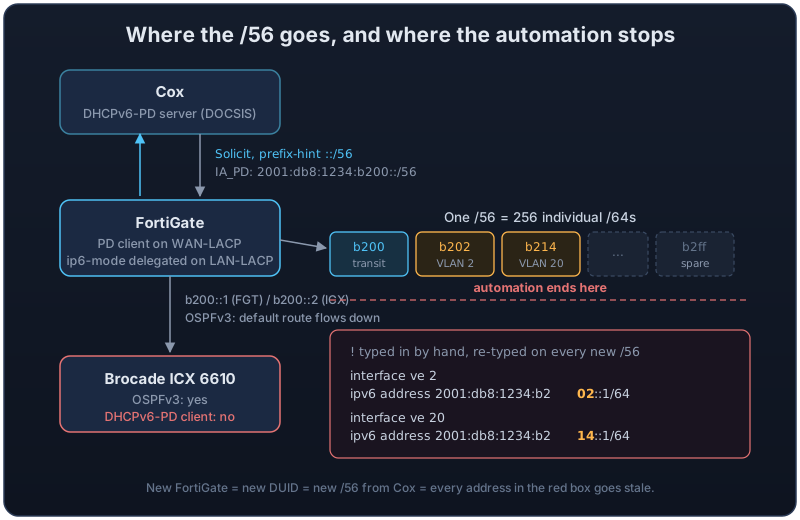
Put together, the whole delegation chain in my network looks like this, including the part where it stops being automatic:
My setup
WAN side (Cox-facing):
config system interface
    edit "WAN-LACP"
        set mode dhcp
        set type aggregate
        set member "wan2" "wan1"
        set role wan
        config ipv6
            set ip6-mode dhcp
            set dhcp6-prefix-delegation enable
            config dhcp6-iapd-list
                edit 46
                next
                edit 1
                    set prefix-hint ::/56
                next
            end
        end
    next
end
The FortiGate’s WAN is a 2-member LACP aggregate (wan1, wan2) sitting on Cox’s DOCSIS handoff. dhcp6-prefix-delegation enable turns on the PD client behavior, and the prefix-hint ::/56 tells Cox’s DHCPv6 server what size I’d like. Cox honors it every time.
LAN side (internal transit toward the Brocade):
config system interface
    edit "LAN-LACP"
        set ip 192.168.255.254 255.255.255.252
        set type aggregate
        set member "internal1" "internal2" "internal3" "internal4" "internal5"
        config ipv6
            set ip6-mode delegated
            set ip6-send-adv enable
            set ip6-manage-flag enable
            set ip6-other-flag enable
            set ip6-delegated-prefix-iaid 1
            set ip6-upstream-interface "WAN-LACP"
            set ip6-subnet ::1/64
        end
    next
end
This is the interesting part. ip6-mode delegated means this interface doesn’t get a static IPv6 address. Instead it carves an address out of whatever prefix was delegated on WAN-LACP (referenced by ip6-delegated-prefix-iaid 1, matching the IAID from the WAN config). ip6-subnet ::1/64 says “take the first /64 out of my delegation and use ::1 as this interface’s address within it.” That resolves to something like 2001:db8:1234:b200::1/64 given my current /56.
The ip6-manage-flag and ip6-other-flag settings control SLAAC behavior on this segment. They tell downstream devices “don’t just self-assign an address, go ask a DHCPv6 server for configuration too.” This matters less than usual here, because this interface isn’t really serving end hosts. It’s my routing transit link to the Brocade core.
Routing glue (OSPFv3):
config router ospf6
    set default-information-originate always
    config area
        edit 0.0.0.0
        next
    end
    config ospf6-interface
        edit "LAN-LACP"
            set interface "LAN-LACP"
            set priority 255
        next
    end
    config redistribute "connected"
        set status enable
    end
end
default-information-originate always means the FortiGate injects an IPv6 default route into OSPFv3 regardless of whether it technically has one of its own, which is useful since I want to guarantee every internal router has a path out, even during a rekey. redistribute connected pushes locally attached subnets (including any DMZ IPv6 segments living directly on the FortiGate) into OSPF as well.
One IPv6-specific thing worth noting if you go to verify any of this: OSPFv3 forms adjacencies and installs next-hops using link-local addresses (fe80::/10), not the global addresses you configured. The first time you look at an IPv6 routing table and see a pile of fe80:: next-hops, that’s normal, not broken.
Where BGP fits in
The FortiGate also runs iBGP (AS 65412) to the Brocade, to a lab peer, and to my three Proxmox hosts via a dynamic neighbor range, mostly to carry the EVPN control plane for Proxmox SDN. Here’s the relevant skeleton (trimmed, secrets redacted):
config router bgp
    set as 65412
    set router-id 192.168.255.254
    set ebgp-multipath enable
    set ibgp-multipath enable
    config neighbor
        edit "10.169.169.1"
            set remote-as 65412
        next
        edit "192.168.255.253"
            set remote-as 65412
        next
    end
    config neighbor-group
        edit "pve-hosts"
            set next-hop-self enable
            set next-hop-self-vpnv4 enable
            set soft-reconfiguration enable
            set soft-reconfiguration-evpn enable
            set remote-as 65412
        next
    end
    config neighbor-range
        edit 1
            set prefix 10.16.230.0 255.255.255.0
            set neighbor-group "pve-hosts"
        next
    end
    config redistribute "connected"
        set status enable
        set route-map "NGBHL_HQ-BGP_Routes"
    end
    config redistribute "ospf"
        set status enable
        set route-map "NGBHL_HQ-BGP_Routes"
    end
    config redistribute6 "connected"
    end
    config redistribute6 "ospf"
    end
end
Every one of those sessions negotiates the IPv6 Unicast and VPNv6 address families. FortiOS advertises them by default when the capability is there, and get router info6 bgp neighbors confirms it on each peer:
  Neighbor capabilities:
    Address family IPv6 Unicast: advertised
    Address family VPNv6 Unicast: advertised
    Address family L2VPN EVPN: advertised and received
 For address family: IPv6 Unicast
  0 accepted prefixes, 0 prefixes in rib
  0 announced prefixes
So the multiprotocol plumbing is up (these are MP-BGP sessions over IPv4 transport), but as of today zero IPv6 routes actually flow through BGP. Notice the redistribute6 blocks in the config above: present, empty, disabled. All IPv6 routing is OSPFv3’s job.
That’s partly deliberate. Turning on redistribute6 is one line, but doing it properly means building an IPv6 route-map and prefix-list mirroring my IPv4 policy, and any prefix-list6 entry that references my delegated space goes stale the moment Cox hands me a new /56. OSPFv3 with default-information-originate always and redistribute connected sidesteps that entirely, since neither references a specific prefix. Until I solve the renumbering problem for real, keeping IPv6 out of BGP policy is one less thing to break.
The Brocade: where the automation stops
My core switch is a Brocade ICX 6610. Old, but stacked with 10/40GbE that I’m still using nearly all of. It runs OSPFv3 just fine and happily learns routes and the default route from the FortiGate. What it can’t do is act as a DHCPv6-PD client. There’s no mechanism for it to say “hey FortiGate, delegate me a sub-block and I’ll configure my own interfaces from it.”
That means every VLAN interface (ve X) that needs a real IPv6 address has one manually assigned, like this:
interface ve 665
 ipv6 address 2001:db8:1234:b200::2/64
 ipv6 ospf area 0.0.0.0
 ipv6 ospf active
!
interface ve 2
 ipv6 address 2001:db8:1234:b202::1/64
!
interface ve 20
 ipv6 address 2001:db8:1234:b214::1/64
!
Each of these was carved out of the /56 using an IPv6 subnet calculator, keeping the last hex digits of the third block roughly aligned with the equivalent IPv4 VLAN ID for my own sanity (VLAN 2 becomes ...b202, VLAN 20 becomes ...b214, and so on). It’s a little goofy, but it means I can eyeball a ve interface’s IPv6 address and immediately know which VLAN it belongs to.
The problem: I don’t get a static /56 from Cox. Every time I swap FortiGates, which happens periodically since I source them from decommissioned units at work, I get a brand new one. IPv4 doesn’t care; DHCP just hands out a new address and life goes on. IPv6 means going back into the Brocade and manually updating every single ve interface with the new prefix.
Caution
Nothing warns you when this happens. The old prefix just stops routing, and every statically configured interface on the Brocade keeps advertising addresses out of space I no longer hold. Dual-stack hosts still prefer IPv6 when it looks available, so the symptom isn’t “IPv6 is down,” it’s “random things are slow or broken until they fall back to IPv4.”
Why the prefix changes on every swap
For a while I filed this under “Cox being Cox,” but the mechanism is more specific than that, and it’s worth understanding. DHCPv6 doesn’t identify clients by MAC address the way DHCPv4 effectively does. It uses a DUID (DHCP Unique Identifier), and the ISP’s delegation binding follows that DUID. FortiOS generates a DUID-LLT, which is built from a hardware address plus a generation timestamp, and there’s no supported knob I’ve found to carry a DUID from one FortiGate to its replacement.
Interesting!
Your delegated prefix isn’t tied to your account or your modem. It follows your router’s DHCPv6 identity, the DUID. New hardware means a new DUID, and a new DUID means Cox treats you as a brand new client and hands you a brand new /56.
People running routers where the DUID can be pinned (EdgeOS, pfSense, plain Linux with systemd-networkd) report reasonably sticky prefixes from Cox once they do so, though never guaranteed sticky. On the FortiGate side I get to treat the prefix as rented by the box, not by me, and engineer around it.
What I’ve done about it (so far)
Since the subnetting logic is fixed, same offsets, same structure, every time, I wrote a small Python script that takes my new first /64 (which becomes subnet #1 by convention) and calculates any subnet index from there, the same way the site24x7 calculator does, but scriptable and instant. It turns a “go re-derive eight subnets by hand” task into a few seconds of copy-paste. It doesn’t touch the Brocade directly yet, but it removes the annoying part of the manual process.
What I actually want: full automation
The real fix is a script that:
- Pulls the current delegated /56 from the FortiGate (via its REST API,
GET /api/v2/monitor/system/interfaceor similar, filtered forLAN-LACP) - Recalculates every
veinterface’s expected IPv6 address using the same fixed offsets I already use - Diffs that against the Brocade’s current running config
- Pushes the delta via SSH (Paramiko and a scripted CLI session, since the ICX doesn’t have a modern API)
This is entirely doable. The FortiGate API is well documented and the Brocade will accept scripted SSH config changes without complaint. It’s just a project I haven’t sat down and built yet.
The longer-term fix
The actual root cause is that the Brocade 6610, however capable it still is for raw switching throughput, is old enough that it predates widespread DHCPv6-PD client support on this class of hardware. Modern L3 switches and routers support acting as a PD client, which would let this whole process happen automatically end to end: Cox delegates to the FortiGate, the FortiGate re-delegates downstream, and the core reconfigures itself.
That’s a “someday” project. Replacing a switch with this much 10/40GbE density in active use isn’t a small undertaking, and the 6610 has been rock solid otherwise. For now, scripting the delta is the pragmatic path.
A few things worth knowing before you turn this on
Some things that aren’t specific to my gear but bit me or nearly did:
The moment you enable IPv6 on a segment, dual-stack hosts start preferring it. There’s no gradual rollout; a working router advertisement changes traffic paths immediately. Make sure your IPv6 firewall policy exists before the RA does, because on the FortiGate, IPv6 policies are a separate policy set from IPv4. The default is deny, which is safe, but “safe” here means “IPv6 silently doesn’t pass traffic,” which is its own fun debugging session.
If you need addresses that survive a re-delegation, ULA space (fd00::/8 from RFC 4193) is the standard answer for stable internal addressing alongside the global prefix. I’ve avoided it so far because running two prefixes per segment brings its own source-address-selection headaches, but it’s the escape hatch if the renumbering pain ever outgrows the scripting.
Useful debug commands
A few commands I lean on when troubleshooting this setup.
State and routing tables
FortiGate:
diagnose ipv6 address list
get router info6 ospf neighbor
get router info6 routing-table ospf
get router info6 bgp neighbors
diagnose debug application dhcp6c -1
diagnose debug enable
Brocade ICX:
show ipv6 interface brief
show ipv6 route
show ipv6 ospf neighbor
show ipv6 ospf database
Ping, the IPv6 way
Ping is still the fastest sanity check, but IPv6 adds a wrinkle worth knowing on both platforms: a plain ping only proves the path from the router’s default source address. After a renumber, the failure you’re hunting is usually a return path for one specific segment, and for that you need to control the source.
FortiGate. The IPv6 ping is execute ping6, and its behavior is shaped by a persistent set of options under execute ping6-options (they stick for the session, so reset when you’re done):
# basic reachability to the Brocade's side of the transit link
execute ping6 2001:db8:1234:b200::2

# prove a specific VLAN's prefix routes end to end:
# source from that segment's gateway and ping something external
execute ping6-options source6 2001:db8:1234:b214::1
execute ping6-options repeat-count 5
execute ping6 2001:4860:4860::8888

# check what you've left set, then put it back
execute ping6-options view-settings
execute ping6-options reset
If that sourced ping works, the whole chain is healthy for that VLAN: the prefix is current, the FortiGate is routing it, and Cox is accepting traffic sourced from it. One caveat from Fortinet’s own troubleshooting guidance: don’t source a ping from one of the FortiGate’s interface addresses to another of its own interface addresses. That fails by design and tells you nothing.
Brocade ICX. FastIron’s version is ping ipv6, with source and outgoing-interface as the useful knobs:
! basic reachability to the FortiGate's side of the transit link
ping ipv6 2001:db8:1234:b200::1

! same end-to-end test from the switch's side:
! source from a VLAN gateway and ping something external
ping ipv6 2001:4860:4860::8888 source 2001:db8:1234:b214::1

! ping a link-local neighbor (needs the interface, since
! fe80:: addresses are ambiguous without one)
ping ipv6 fe80::xxxx:xxxx:xxxx:xxxx outgoing-interface ve 665
That last one is the IPv6-specific habit to build. Link-local addresses exist on every interface simultaneously, so the switch has no idea which segment you mean unless you tell it. It’s also the ping that keeps working when your global prefix is stale, which makes it the cleanest way to separate “the transit link is down” from “my addressing is out of date.” If the link-local ping to the FortiGate succeeds but the global one fails, you already know which problem you have.
Tip
Run the
dhcp6cdebug immediately after a FortiGate swap. It shows the actual PD exchange with Cox in real time, including the prefix that comes back, which saves you from guessing whether the delay is DHCPv6-PD related or an OSPF adjacency problem further downstream.
Closing thoughts
None of this is exotic. DHCPv6-PD is a mature, well-supported standard, and the FortiGate side of my setup handles it without any fuss. The friction is entirely a hardware-generation problem on the Brocade side, compounded by a prefix that follows a DUID I can’t keep. If you’re building something similar and shopping for core switching gear, “DHCPv6-PD client support” is worth putting on your checklist early, because retrofitting automation around a switch that can’t do it is a lot more work than just picking one that can.
References and further reading
- IPv6 prefix delegation, FortiOS Administration Guide - Fortinet’s worked example of the upstream/downstream PD configuration used here.
- RFC 9915: Dynamic Host Configuration Protocol for IPv6 (DHCPv6) - the current DHCPv6 spec, including prefix delegation. It recently replaced RFC 8415, which itself absorbed the original PD spec (RFC 3633).
- Getting DHCPv6 IAID and DHCPv6 Client DUID on an interface, Fortinet Community - confirms FortiOS uses DUID-LLT as its DHCPv6 client identity, and how to see it in debug output.
- DHCPv6 Prefix Delegation on a FortiGate Firewall, Weberblog - a thorough hands-on walkthrough of the same FortiOS PD machinery, including the gotchas around
ip6-subnetdefaults. - Using PING options from the FortiGate CLI, Fortinet Community - the full
ping6-optionsreference, including the local-interface-to-local-interface caveat. - Pinging an IPv6 address, FastIron Layer 3 Routing Configuration Guide - the
ping ipv6syntax on the ICX, with thesourceandoutgoing-interfaceparameters.